E4MC stands for Easy For Minecraft, and it’s exactly that a clever little addon made by a solo developer named SkyVG. In simple words, it takes your single-player world and makes it reachable from anywhere in the world without any of the usual headaches.
When you open your world to LAN, E4MC quietly connects through safe relay servers using the same QUIC technology that powers YouTube and Google. Your friends get a clean link like “random123.e4mc.link”, and they join straight from the multiplayer menu. No extra mods for them, no exposing your real IP, nothing.
It works on every Minecraft version from 1.17 all the way up to the latest 1.21 snapshots. You can use it with vanilla, Fabric, Forge, Quilt, huge modpacks — literally anything. A lot of popular modpacks like Fabulously Optimized even include it by default now, so thousands of players are already using it without realising.
The best part? It’s completely free forever, open-source on GitHub, and does one job perfectly: letting you play with your friends in under two minutes.
E4MC: How to Set It Up
Setting this up is so easy. First, you need a mod loader — Fabric is the friendliest for beginners, but Forge or Quilt work just as well. Install the loader once (takes 30 seconds), then grab the latest E4MC file from Modrinth.
Drop the .jar into your mods folder, launch Minecraft with the right profile, and load your world (or make a new one). Hit Esc, go to Open to LAN, flip the switch, and click Start LAN World.
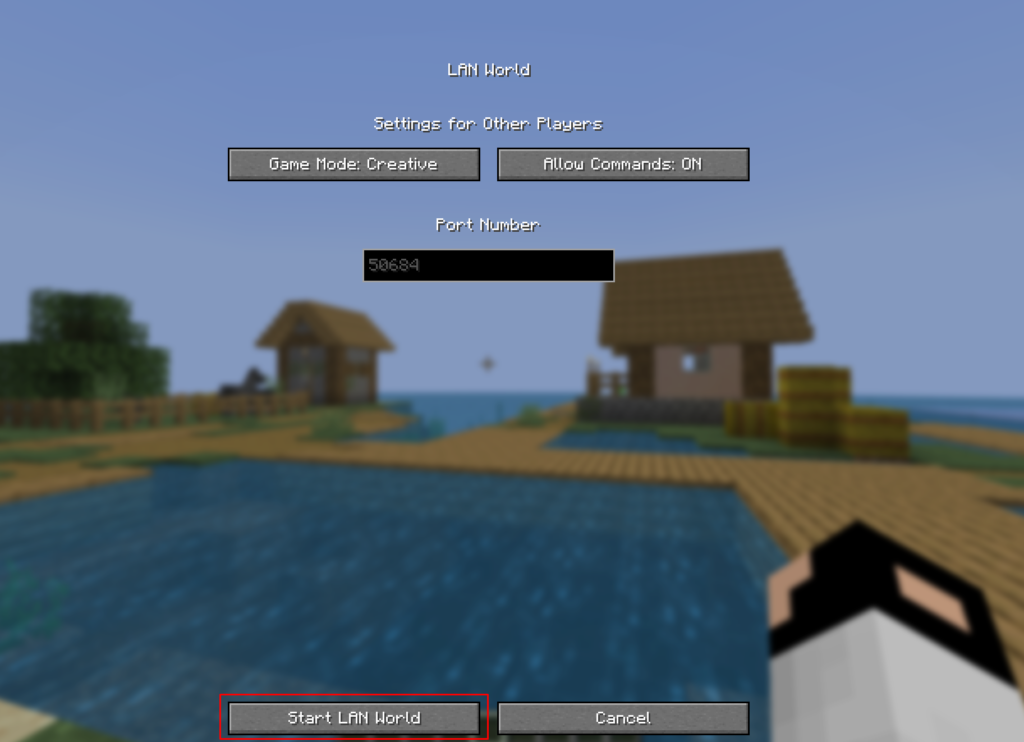
Boom, a link instantly appears right in your chat.

Copy that link and send it to your friends on Discord, WhatsApp, wherever. They open Minecraft, go to Multiplayer → Direct Connect, paste the link, and hit Join. That’s it. They don’t need E4MC; they don’t need anything extra.
If your world has mods, they just need the same mod list (easy with a modpack launcher). The link changes every time you open LAN, but that takes two seconds to share again. I’ve helped my friends set this up over voice chat and we were all playing together.
Is E4MC Safe?
Yes, and I was super sceptical at first too. But once you understand how it works, you realise it’s actually safer than most things out there. Everything is encrypted end-to-end, including both standard Minecraft traffic and the QUIC connection. Even if someone tried to snoop, they’d just see gibberish.
The relay servers only forward packets; they never see your actual world, your chat, or your IP address. Your real IP stays completely hidden. Plus, because the whole thing is open-source, anyone (including security nerds) can check the code themselves on GitHub. No shady backdoors, no data collection.
I’ve been using it for months with friends across different countries and never once had a security scare. Millions of players use it daily, including in big modpacks, and the developer has a solid reputation. It’s way safer than old things like Hamachi or opening ports on your router. As long as you download it from Modrinth or CurseForge (never random sites), you’re golden.
The Real Downsides of E4MC
Look, I love E4MC, but I’m not gonna sugar-coat it — it’s not perfect for every situation. The biggest thing is that your own PC becomes the server. So when you log off or shut down, everyone gets kicked. No 24/7 play unless you literally leave your computer running all night (not great for electricity bills).
The link also changes every single time you open LAN, so you have to share it fresh each session. Performance-wise, everything runs on your hardware and upload speed. If your PC is older or you’re running a massive modpack with 8+ friends, you’ll feel lag. The world is only as strong as your CPU and internet.
There’s no fancy control panel, no easy backups (you have to do it manually), and no plugins like a real server. If the relay servers ever go down (rare, but it’s run by one dev), you’re temporarily stuck. And if your world corrupts, there’s no magic rollback button.
It’s perfect for casual weekend nights with 4–8 friends, but once your group wants something permanent or bigger, you’ll naturally start looking at proper hosting. That’s just the honest truth. (201 words)
E4MC vs Essentials
A lot of people ask me “Should I use E4MC or the Essential mod?” Both are awesome and free, but they solve different problems.
E4MC is pure and simple: only you install it, zero extra features, just lightning-fast hosting. Your friends join with nothing extra, and you’re playing in seconds. Essential is more like a full social hub; everyone has to install it, but you get a friends list, easy invites from the main menu, voice chat, emotes, cosmetics, and screenshot sharing. It feels like Minecraft with Discord built in.
| Feature | E4MC | Essential Mod |
|---|---|---|
| Who installs? | ✅ Only host | ❌ Everyone |
| Extra stuff | Fast, but everyone does it | Friends tab, invites, cosmetics |
| Setup speed | 2 minutes | Fast but everyone does it |
| Bloat level | Almost zero | Some extras (great for social groups) |
| Best for | Quick casual nights | Groups who love the social side |
If you just want to play and keep things light, E4MC wins every time. If your squad loves all the fun extras and doesn’t mind installing one more mod, Essential is fantastic. Most of my friends stuck with E4MC because it feels cleaner and faster. Both are great.
E4MC vs Actually Hosting a Server
Sometimes E4MC is perfect… and sometimes you outgrow it. Here’s how it stacks up against real server hosting (Aternos, BisectHosting, or any paid/free host):
E4MC is free forever and sets up in two minutes. A real host costs money (or has limits on free ones) but stays online 24/7 even when you’re at school or sleeping. With E4MC your PC does all the work, so performance depends on your hardware. A hosted server has proper power, so bigger groups and huge modpacks run more smoothly.
You can have 8 friends comfortably on E4MC. Real hosting easily handles 20–100 players. E4MC has no plugins or control panels; real hosting gives you full admin tools, automatic backups, and easy updates.
I always tell my friends: start with E4MC for fun weekend sessions — it’s unbeatable. When you want the world to run all the time or your group gets bigger, switch to a cheap host. Many people use both — E4MC for quick nights, proper hosting for long-term survival worlds. No shame in either! (197 words)
Pro Tips for the Smoothest Experience
Want everything to feel buttery smooth? Give Minecraft more RAM in your launcher (8–12 GB if your PC can handle it). Lower render distance to 12–16 chunks when friends join — it makes a massive difference. Pregenerate your world if you’re using a big modpack (there are free tools for that).
Keep your upload speed in mind; most home connections are fine for 6–8 players, but test first. Make manual backups by copying your world folder every few days. Use the same exact mod list for everyone (a modpack launcher makes this painless). And if lag ever hits, just ask everyone to turn down their settings for a bit.
I always start small, invite two friends first to see how my PC handles it before bringing the whole squad. These little tricks turned my sessions from “pretty good” to “this feels like a real server.” Trust me, spend five minutes tweaking and you’ll thank yourself later. (192 words)
Why E4MC Is Honestly the Best for Most Friends
At the end of the day, if you and your buddies just want to jump into a world tonight, laugh, build stupid stuff, and survive together without any drama — E4MC is the clear winner. It removes every single barrier that used to kill multiplayer for casual players.
FAQ — Stuff Everyone Asks
Do my friends need to install anything?
Nope! Only you need E4MC.
Is the link permanent?
No, new one each time you open LAN. Just share the fresh link.
What if we want it online 24/7?
Then switch to a proper hosting service.
Important Links
| What You Need | Link | Quick Note |
|---|---|---|
| E4MC Mod | https://modrinth.com/mod/e4mc | Always up to date and clean |
| Official E4MC Info | https://e4mc.link | Simple guides |
| Essential Mod (extra features) | https://essential.gg | Great social alternative |
| Fabric Loader (easiest) | https://fabricmc.net | Beginner friendly |